
Introduction
Rolling out a digital asset management (DAM) system takes more than a software install. It is a structured, multi-phase project that touches technology, workflow, and organizational change at the same time. The platform you pick matters far less than how well you plan the rollout around it.
Implementation typically falls to marketing operations, IT, or a dedicated content ops team, often working alongside external implementation specialists when compliance or regulatory requirements are involved. Skip the planning and the failure modes are predictable: low adoption, siloed content, wasted budget, and migration errors that take months to untangle.
When the rollout is planned well, the gains show up quickly. According to Bynder, Movado Group cut asset search and retrieval time by roughly 50% after unifying its brand portfolio on a single DAM platform.
This guide walks through the full DAM implementation process, from readiness assessment through rollout and validation, following the sequence experienced implementation teams actually use.
Key Takeaways
- DAM implementation runs through four broad phases: assess, plan and select, migrate and configure, train and launch.
- Success depends on stakeholder alignment, clean data migration, and a phased rollout — not one "go-live" event.
- Poor metadata planning, rushed migration, and thin training cause most post-launch problems.
- Timelines range from 4-6 weeks for small deployments to 3-6 months or more for enterprise rollouts.
DAM Implementation Guide: Step-by-Step Process
Implementation moves through assessment, strategy and platform selection, configuration and migration, integration, training, phased rollout, and ongoing optimization. No phase runs in isolation. Marketing, IT, brand teams, and (for regulated industries) legal or compliance stakeholders all need a seat at the table.
Timelines vary sharply by scope. Aprimo notes that a straightforward implementation can take 4-6 weeks for basic configuration and migration. Organizations with fewer than 50,000 assets generally need 6-12 weeks. Enterprise deployments with complex integrations often run 3-6 months or longer.
Plan your internal resourcing around the larger end of that range. It's cheaper than blowing a rushed deadline.
Prerequisites and Readiness Assessment
Before evaluating a single vendor, audit what you already have. Catalog:
- Content types and volumes — images, video, presentations, investor documents, campaign assets
- File formats currently in use across departments
- Storage locations — shared drives, legacy DAMs, individual desktops, cloud folders
Next, check compatibility against your existing stack (CMS, PIM, CRM, and creative tools) to flag integration requirements early rather than discovering gaps mid-migration.
Organizational readiness matters just as much as the technical audit. Confirm you have:
- Executive sponsorship
- Approved budget
- One designated implementation owner who can decide without escalating every question
For regulated industries, governance goes further: map usage rights, retention schedules, and access controls for compliance-sensitive marketing or investor materials before migration begins.
Non-negotiable: don't proceed without cross-departmental stakeholder buy-in and a defined metadata and taxonomy plan. Retrofitting either one after go-live is expensive and disruptive. Bynder recommends allocating 8-12 weeks for a full DAM audit covering discovery, taxonomy, and permissions alone.
Tools and Resources Needed for DAM Implementation
Every implementation needs a core set of resources:
- DAM platform license matched to your use case and asset volume
- Migration/ETL tooling for moving assets and metadata into the new system
- Metadata standards documentation defining fields, naming conventions, and taxonomy
- Project management tooling to track milestones across departments
What's essential versus optional depends on scale. Large libraries benefit from dedicated migration tools; smaller collections can often be tagged manually without much extra cost. AI auto-tagging is a valuable accelerator, not a requirement. It's useful once you're managing tens of thousands of assets, and less critical below that threshold.
Bring in an implementation specialist when migration scope is large, integrations are heavy, or compliance requirements are complex. In-house teams handle simpler rollouts fine; regulated-industry projects with investor communications or marketing approval workflows usually move faster with outside guidance.
How to Implement a DAM System (Step-by-Step)
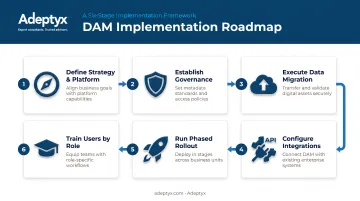
- Define your strategy and choose the platform. Match features to actual use cases — brand management, sales enablement, or compliance-heavy content — rather than picking based on brand recognition alone.
- Establish governance before migration starts. Define user roles (admins, contributors, approvers), permissions, and your metadata schema. Adobe recommends documenting policies, workflows, and approval chains as part of this framework.
- Execute data migration. Audit, clean, and map existing assets with consistent naming conventions. Archive or retire obsolete files rather than dragging them into the new system.
- Configure integrations. Connect the DAM to your CMS, creative tools, marketing automation platform, and — for regulated industries — compliance review workflows, ideally via API.
- Run a phased or pilot rollout. Launch with one department or asset type, gather feedback, then expand. MediaValet recommends piloting with a representative sample of 500-1,000 assets before a full-scale migration.
- Train users by role. Supplement vendor training with internal documentation covering your specific workflows and guidelines — generic training rarely sticks.
Post-Implementation Checks and Validation
Before calling it done, test:
- Search accuracy — do the right assets surface for common queries?
- Metadata completeness — are required fields populated across the migrated library?
- Permission settings — do role-based restrictions actually work as designed?
Run functional tests to confirm integrations sync correctly and that version updates propagate across every connected channel. Then track adoption over the first 30, 60, and 90 days — login frequency, asset downloads, and search success rate are the metrics that reveal whether people are actually using the system.
Skipping this stage doesn't make problems disappear. It just delays them. Duplicate content, broken links, and governance failures tend to surface a few months later, when they're far harder to trace back to their source.
Common DAM Implementation Challenges and Fixes
Three issues show up again and again during and shortly after DAM rollouts. Here's what causes each one, and what actually fixes it.
Issue 1: Low User Adoption
Problem: Teams keep using old folders or shared drives instead of the new DAM.
Likely cause: Insufficient training, unclear communication of the benefits, or workflows built around the platform rather than around how people actually work.
Fix: Appoint department champions who model correct usage, and embed the DAM into existing workflows rather than treating it as an extra step. Run refresher training tied to live projects, not generic tutorials.
Issue 2: Messy or Incomplete Data Migration
Problem: Assets land in the new system without proper metadata, or organized in ways nobody can navigate.
Likely cause: Skipping the pre-migration audit and cleanup, or underestimating how long migration actually takes.
Fix: Conduct a thorough asset audit and metadata mapping exercise before migration starts. For large libraries, migrate by asset type in phases rather than attempting everything at once.
Issue 3: Integration and Workflow Gaps
Problem: The DAM operates as a silo, disconnected from the CMS, creative tools, or compliance approval processes.
Likely cause: Integration treated as a nice-to-have instead of a core implementation requirement from day one.
Fix: Adopt an API-first integration approach from the start. For compliance-heavy content, bring legal and compliance stakeholders in early.

Regulated firms see real gains from that discipline. Walker Advertising, operating in a heavily regulated industry, saved 22 hours per week after implementation while still meeting compliance requirements.
A structured consulting approach helps close the gap between systems and governance. Adeptyx works with asset and wealth management firms to map current-state workflows and data flows, define a target integration model, and validate it before full rollout. That sequence keeps governance and system connectivity aligned instead of bolting them on after go-live.
Best Practices for Successful DAM Implementation
A few sequencing choices separate smooth DAM rollouts from painful ones:
- Hold migration until governance and taxonomy are finalized, and build buffer time for testing—it always takes longer than planned
- Document as you go: publish internal DAM usage guidelines and require formal sign-off at each milestone, not only at go-live
- Treat go-live as the start: assign internal champions and keep collecting feedback after launch instead of declaring victory and moving on
For complex migrations, heavy integrations, or regulated-industry compliance needs, a structured phased methodology usually beats an ad hoc approach. Asset and wealth management firms often manage large volumes of investor communications and marketing content under strict governance rules, so a clear phase model matters.
Adeptyx applies its Assess, Advise, Design, Deliver framework to these implementations:
- Assess: Identify gaps against industry standards
- Advise: Build the roadmap and business case
- Design: Define requirements and configure the solution
- Deliver: Manage rollout, training, and change management through go-live

Conclusion
Implementation quality determines whether a DAM delivers on adoption, ROI, and long-term content governance, or becomes another underused system competing with shared drives.
Careful preparation, disciplined phased execution, and continuous validation after launch separate rollouts that stick from those that quietly fail within six months.
Frequently Asked Questions
What does digital asset management do?
DAM centralizes the storage, organization, and distribution of digital files through metadata-driven search, version control, and governed access. It replaces scattered folders and drives with one searchable, permission-controlled source of truth.
What are some examples of digital asset management?
Common platforms include Bynder, Aprimo, Adobe Experience Manager Assets, MediaValet, and Brandfolder by Smartsheet. They differ in focus: some emphasize brand portals and creative operations, others target enterprise-scale content lifecycles.
Does Microsoft have a DAM?
Microsoft doesn't offer a dedicated, standalone DAM product. SharePoint and OneDrive provide basic asset libraries but lack true DAM capabilities like advanced metadata governance or workflow automation. Third-party DAMs commonly integrate with Microsoft 365 instead.
How long does DAM implementation typically take?
Small deployments with fewer than 50,000 assets generally take 6-12 weeks. Enterprise rollouts with heavy integrations and larger libraries often run 3-6 months or more, depending on migration and customization complexity.
What's the difference between a DAM and a CMS?
A CMS publishes and manages content for specific channels, like a website. A DAM stores and governs the underlying assets — images, video, documents — used across all channels. Most organizations run both together.
How much does DAM implementation cost?
Cost depends on licensing, migration complexity, required integrations, and training scope. Total cost of ownership should also account for ongoing maintenance, storage growth, and user support beyond the initial rollout.